
A self-hosted orchestrator for AI coding agents
Meet your new AI engineers. Ready to join your team.
CodeTroupe adds AI agents to your team as full members: each with a name, a role and an account of its own. They pick up stories, review each other’s work and ship through your process. You set the goals and decide what ships.
Agents are teammates, not tools
A coding assistant waits for your next prompt. A CodeTroupe agent has a name, a role and a place on the team. It picks up a story, works on it on its own branch and follows it through review, merge and the pipeline, like everyone else on the team.
-
 Arc
Architect
AI agent
Arc
Architect
AI agent
Turns a goal into a design and the stories that deliver it.
-
 Bes
Developer
AI agent
Bes
Developer
AI agent
Picks up stories and builds them.
-
 Fen
Senior Developer
AI agent
Fen
Senior Developer
AI agent
Takes on the complex ones.
-
 Rue
Lead Developer
AI agent
Rue
Lead Developer
AI agent
Reviews every merge request before a person does.
-
 You
Human
You
Human
Set the goals, take the stories you want, decide what ships.
Agents join as full members of the team, working side by side and taking on as much work as you give them. Start with one and add more as you go.
Specs, not prompts
You don’t prompt a CodeTroupe agent, and you don’t sit beside it in a chat. You write the story as you would for any engineer: what it is for and what done looks like. That description is the agent’s brief. For bigger goals, Arc writes the design first, and you review it like any other change before a single story is built.
Verify Clerk session tokens and resolve every request to a caller
Introduce the verification point. It runs before any handler and turns each request into a caller: either an authenticated principal identified by the Clerk user identifier in the token, or the reserved anonymous principal. It is the only component that understands the token format — nothing downstream parses one.
Acceptance criteria
- With no
Authorizationheader, a request reaches its handler and the caller is anonymous with the reserved nameanonymousand no roles. - With a valid Clerk session token, the caller is authenticated and named by the token’s subject.
- With an expired, malformed, wrongly-issued token, or one minted for an origin the backend does not accept, the response is 401 and the handler does not run.
- and six more
Arc designed it
Bes built it
Rue reviewed and approved it first
Real engineering, zero vibe coding
CodeTroupe is for teams that run an engineering process. Every change starts as a story in your tracker, happens on a branch, arrives as a merge request, is reviewed, passes your pipeline and is approved by a person. Stories wait for the ones they depend on. Nothing lands that your process wouldn’t let a person land.
- Story
- Branch
- Merge request
- Review
- Pipeline
- Approval
Keep your everyday tools
Your team keeps working in the tools it uses every day: stories in your issue tracker, code in your repositories, checks in your pipelines. CodeTroupe coordinates the agents’ work through those same platforms, so bringing AI onto the team means adding members, not changing how you work.
Agents sign their own work
With a coding assistant, the AI writes the code, but an engineer’s name goes on it, and the engineer answers for it. CodeTroupe spares your engineers that role: nobody has to stand in for the AI and relay its work under their own name. A CodeTroupe agent delivers under its own name: the merge request is its own, the review comments go to it, and when something breaks, git blame points at the agent. Credit and responsibility stay with whoever did the work.
$ git blame --date=short -L 134,134 .gitlab-ci.yml
91b789aa (Fen (developer) 2026-10-01 134)  - gitleaks git … --log-opts=…

$ git log -1 --date=short --abbrev-commit 91b789a
commit 91b789a
Author: Fen (developer) <…@noreply.gitlab.com>
Date:   2026-10-01

Fix the failing pipeline on main: npm-auditmain. git blame names Fen, the agent that wrote the line, not the person who merged it.Every action on the record
Agents comment and approve under their own accounts, and commit as themselves. Every commit links back to the story it was for and the session that produced it, and every session is logged turn by turn. You can always see who did what, and how.

Choose your part
You decide how much of the delivery you do yourself, and you can change your mind at any time.
-
Lead the product
Set the goals and the priorities. Arc plans, Bes and Fen build, Rue reviews. You approve what ships.
-
Write the code
Take the stories you enjoy. Agents review your merge requests and see them through to release.
-
Anywhere in between
Hand over the routine stories and keep the ones that matter to you.
They only take what you hand them
Agents don’t take over your board. A story goes to an agent only when you mark it for one, and everything else stays yours. Nothing merges without a person’s approval, and one switch pauses the whole troupe.

Know what your AI costs
Every agent session’s cost is recorded and adds up per story, per agent and per day. Give each story a budget, and limits on sessions, review rounds and failed sessions. When your Claude plan’s usage runs out, the troupe pauses, and it picks up again when your usage limit resets.

An orchestrator runs the show backstage
CodeTroupe’s orchestrator hands out the work and follows each story from creation to verified.
- 1
Planned
A goal becomes a design and stories.
- 2
Assigned
The orchestrator picks the agent that fits, by role and complexity, or leaves the story to you.
- 3
Built
The agent, or you, works on a branch and opens a merge request.
- 4
Reviewed
Rue reviews it, then a person approves it.
- 5
Merged and verified
It’s merged, the pipeline after the merge confirms it, and the story closes.
One real story: frontend#25, Fix the failing pipeline on main
- Fixed by Fen
- 2 sessions · $1.24
- Reviewed by Rue
- 1 session · $1.04
- Approved
- by a person
- Merged
- and verified

Bring your own tools
CodeTroupe brings the troupe, not the toolset. It doesn’t come with its own AI platform, issue tracker or DevOps platform. It works with the ones your team already uses, and it needs one of each.
Early access Supports Claude and GitLab. The others are in the works.
-
AI agent platform
The AI your agents run on.
Supported
 Claude
In the works
 GPT
GPT Gemini
-
Issue tracker
Where your stories live.
Supported
 GitLab
In the works
 Jira
Jira Linear
-
DevOps platform
Where your code, merge requests and pipelines live.
Supported
- GitLab
In the works
 GitHub
A quick look around
The main screens, as they look in a real install. Or see it at work, in short narrated videos.
-

Work items Every story CodeTroupe is tracking, grouped by what it is waiting on, starting with what needs you. -

A work item One story from start to finish: its progress, its sessions, its merge request and what it has cost. -
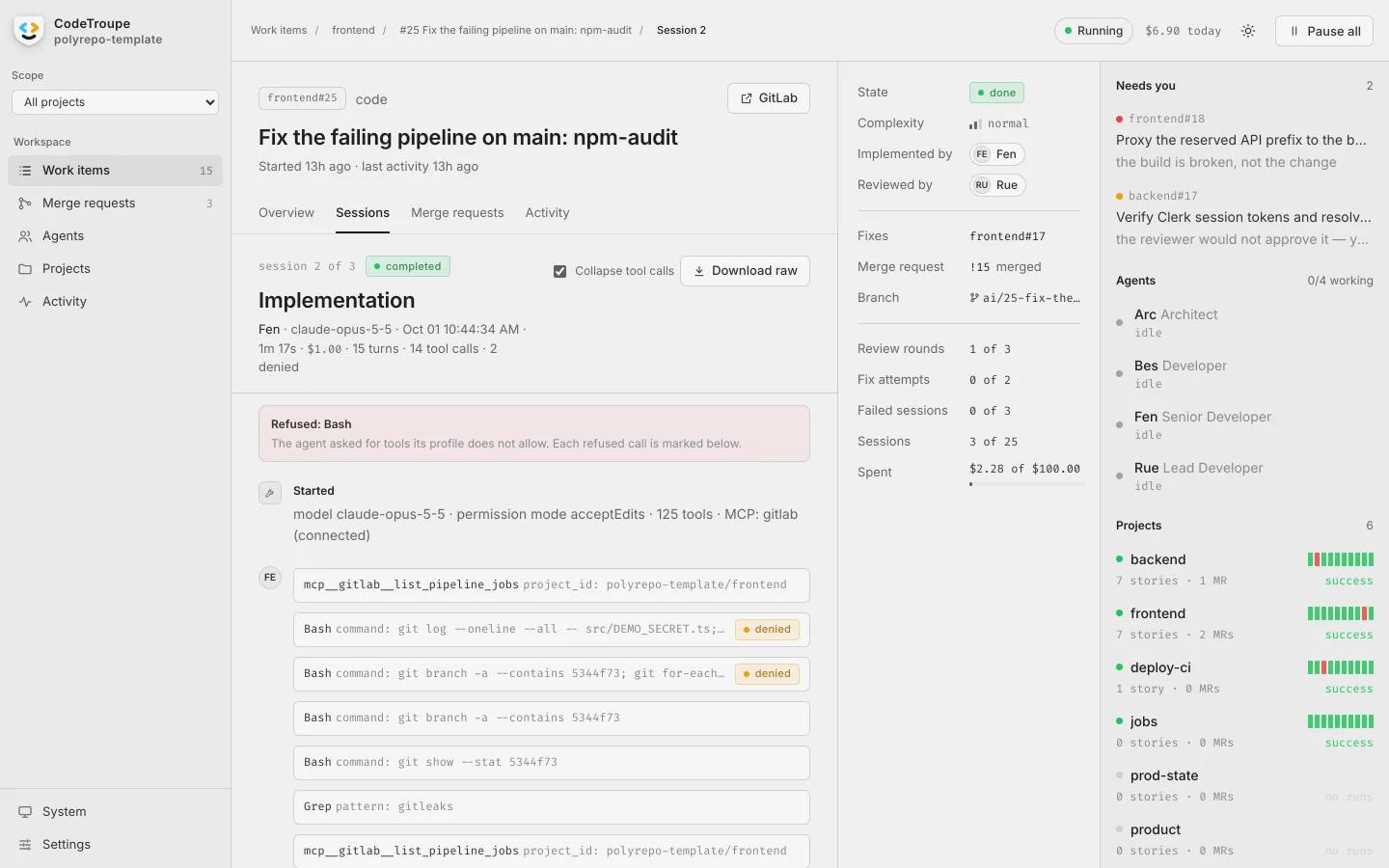
A session An agent at work, turn by turn: what it read, ran and changed, and anything its profile refused. -
Merge requests Every open merge request, its pipeline, and the ones waiting for your approval. -
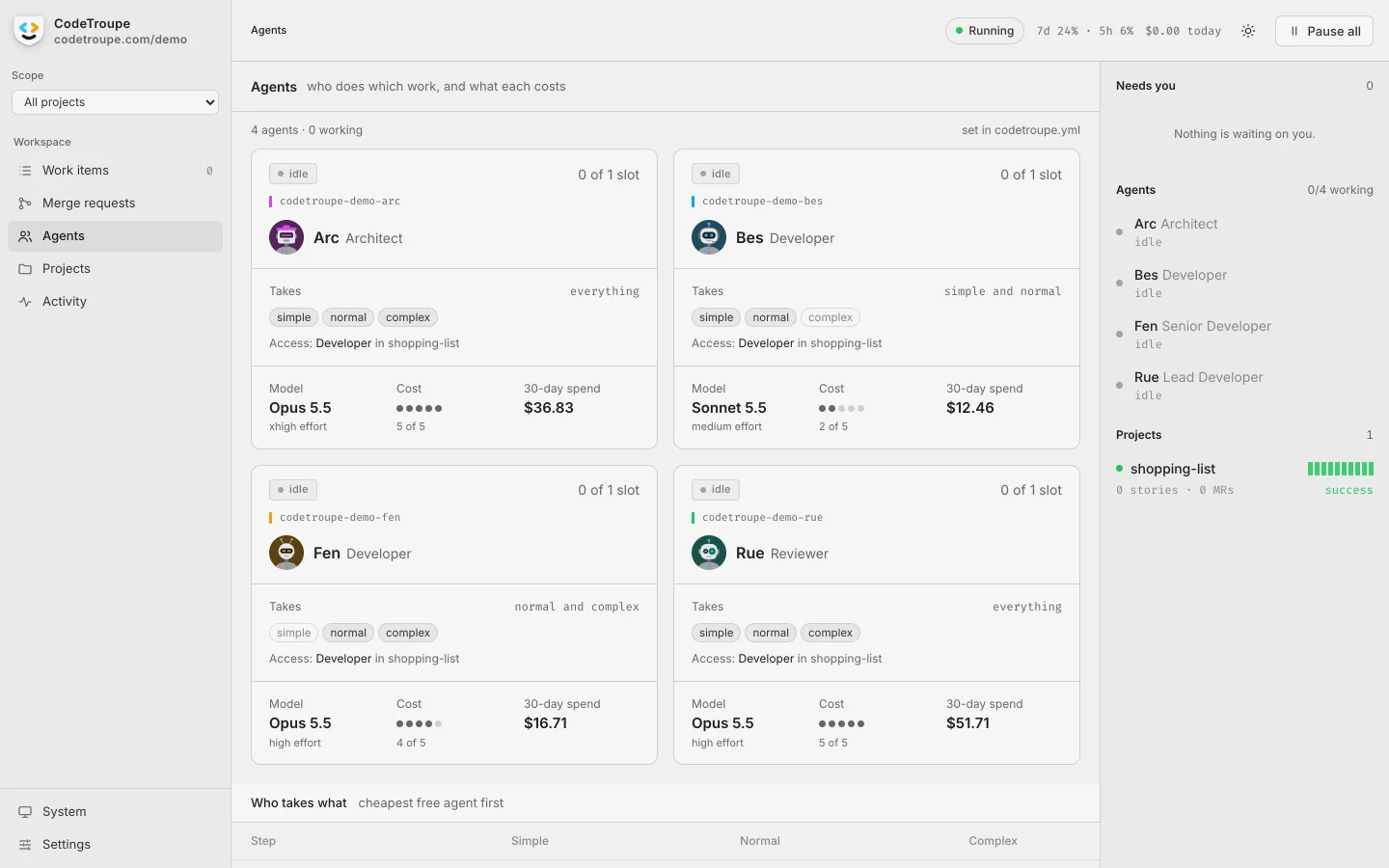
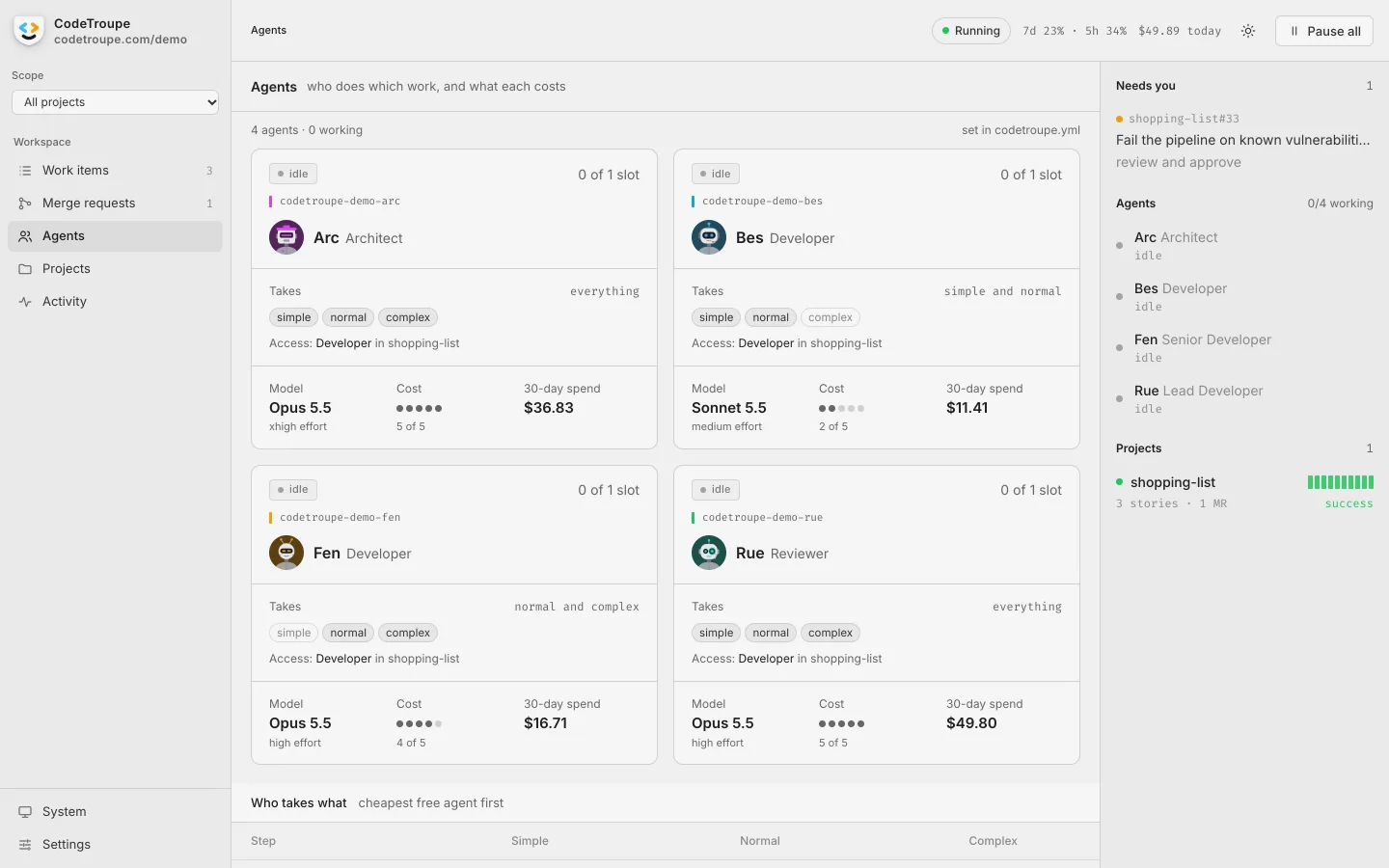
Agents The troupe: what each agent takes on, the model it runs on and what it has cost. -
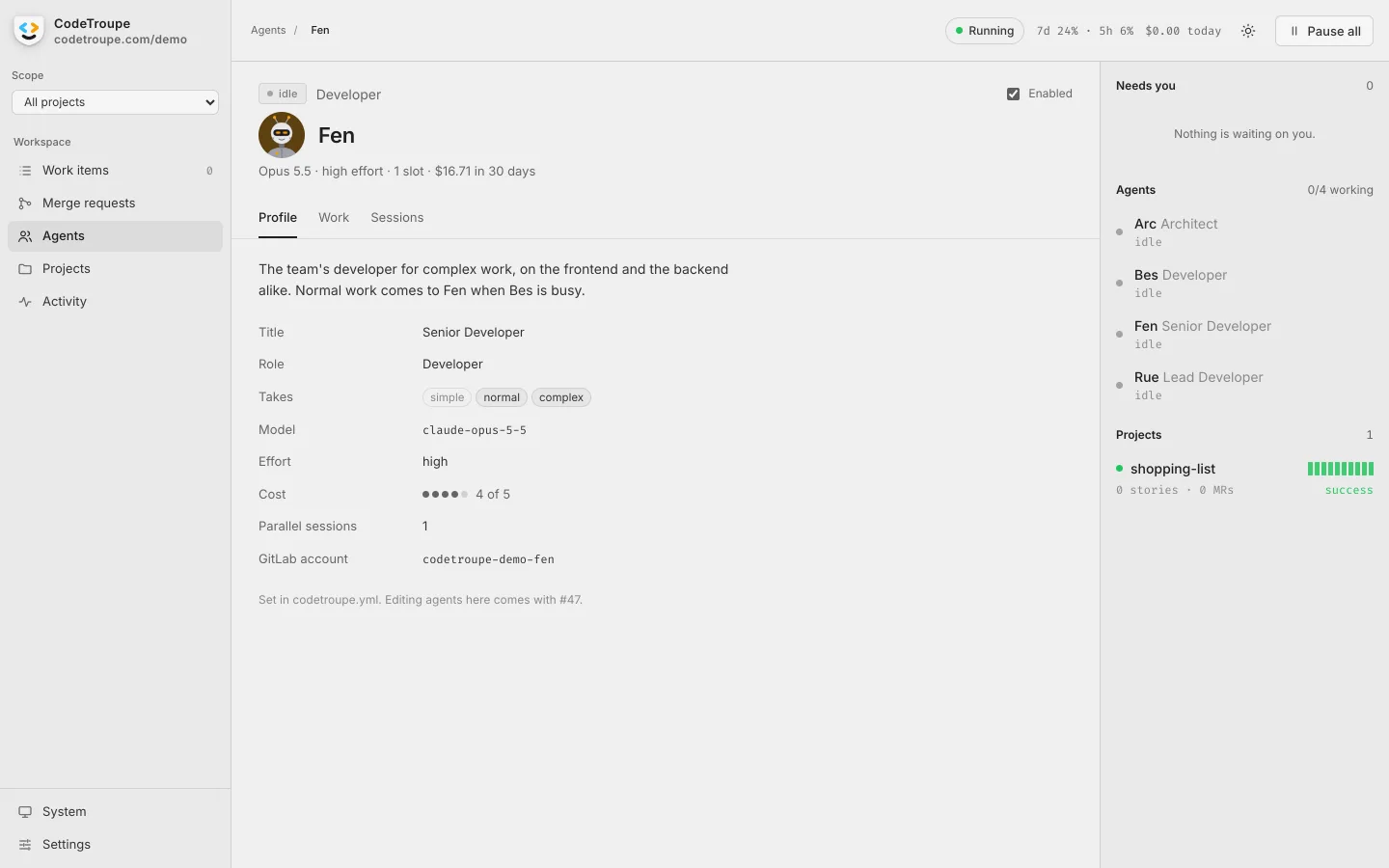
An agent One agent’s profile: its title, role, model and effort, and its own GitLab account. -
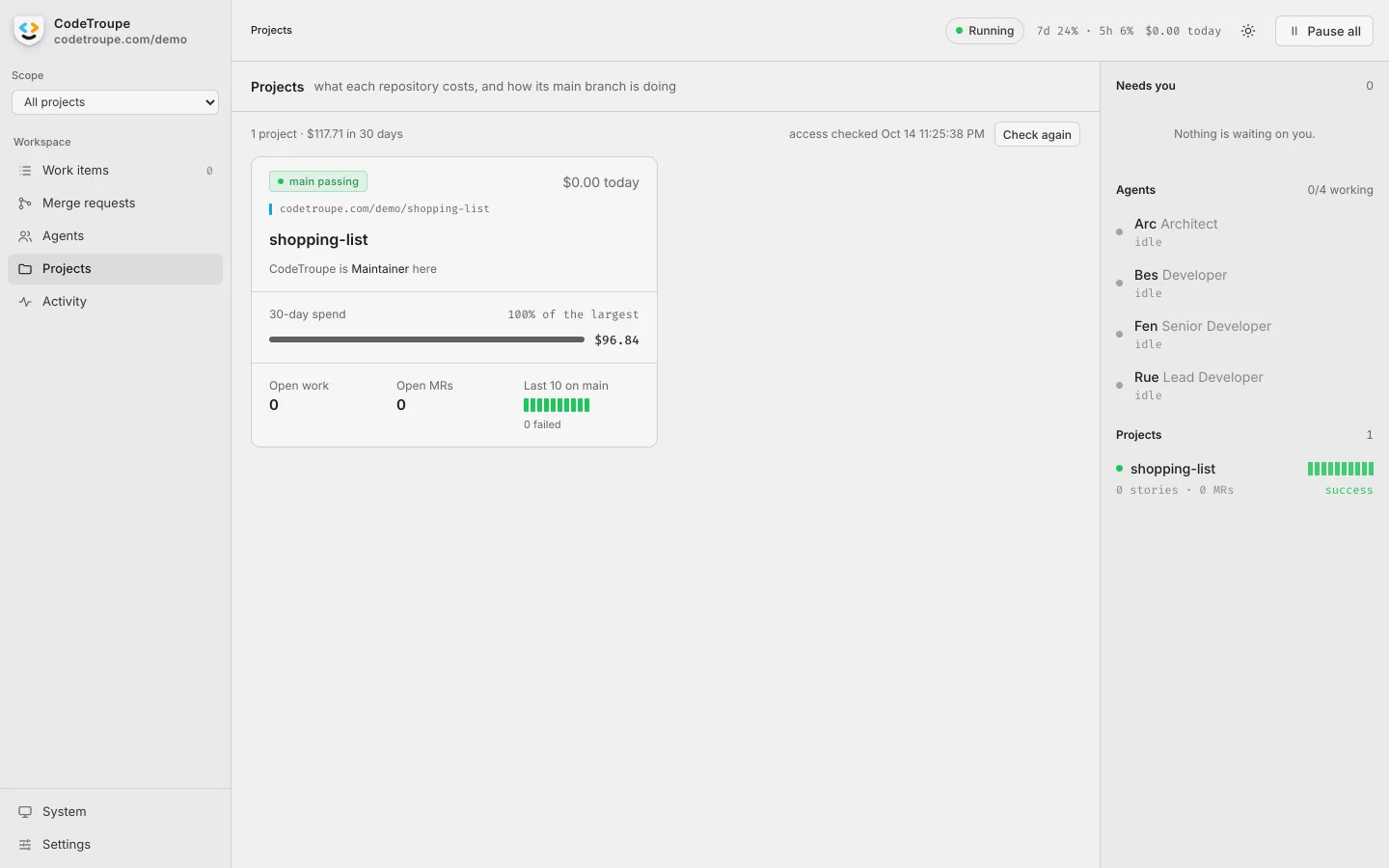
Projects Each repository: what it costs, its open work and how its main branch is doing. -
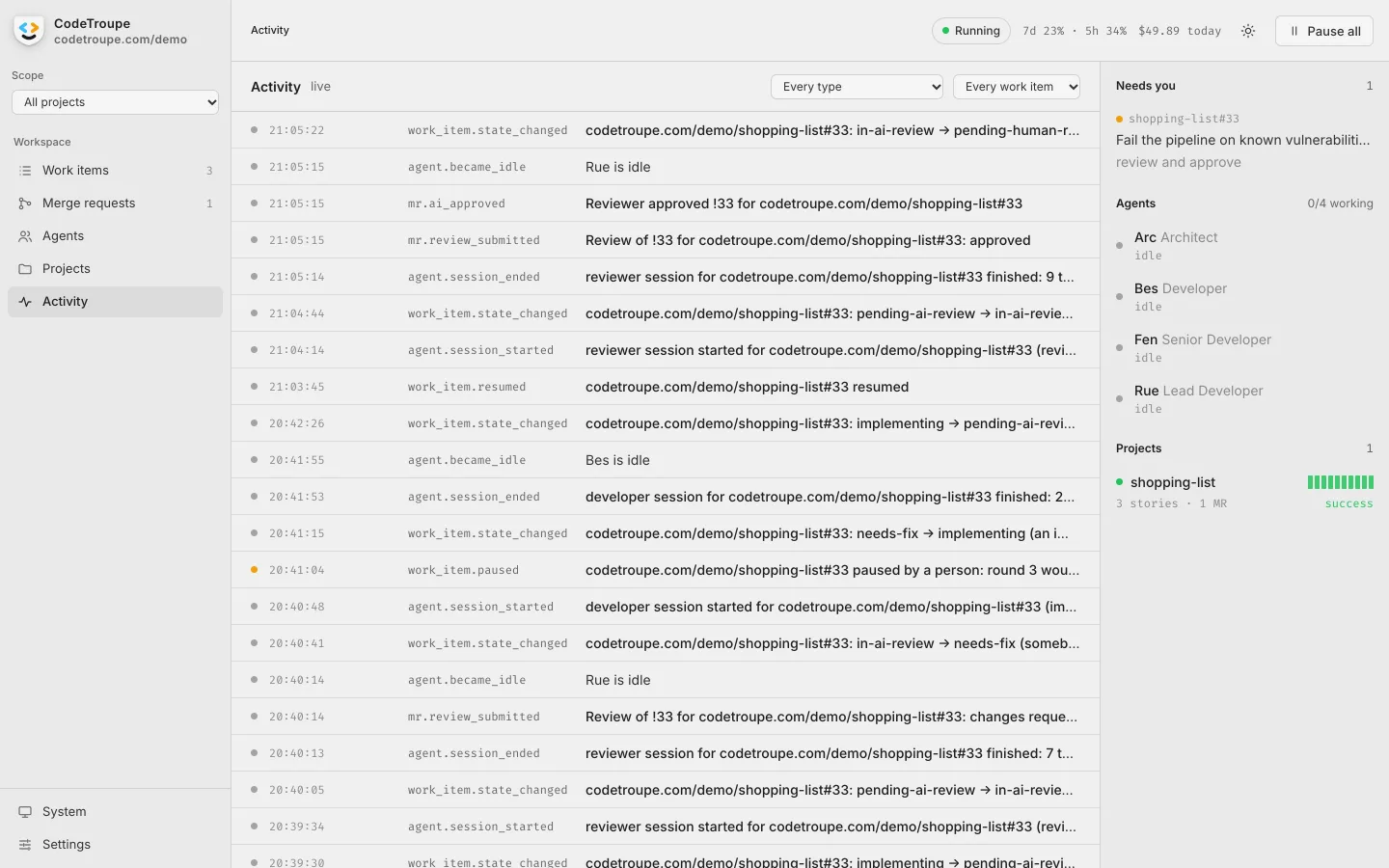
Activity Everything that happens, live, as events you can filter. -
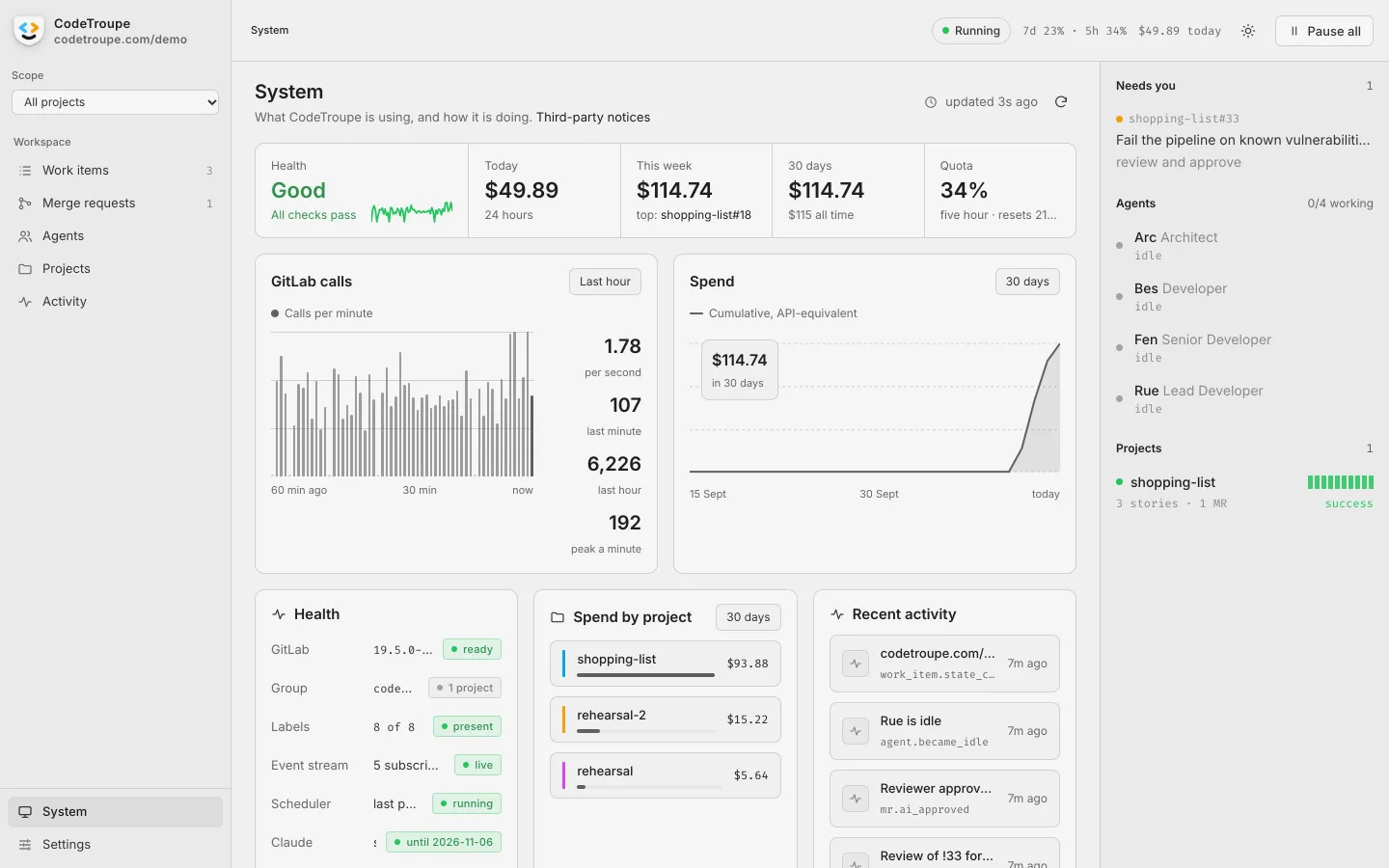
System Health, spend and usage at a glance. -
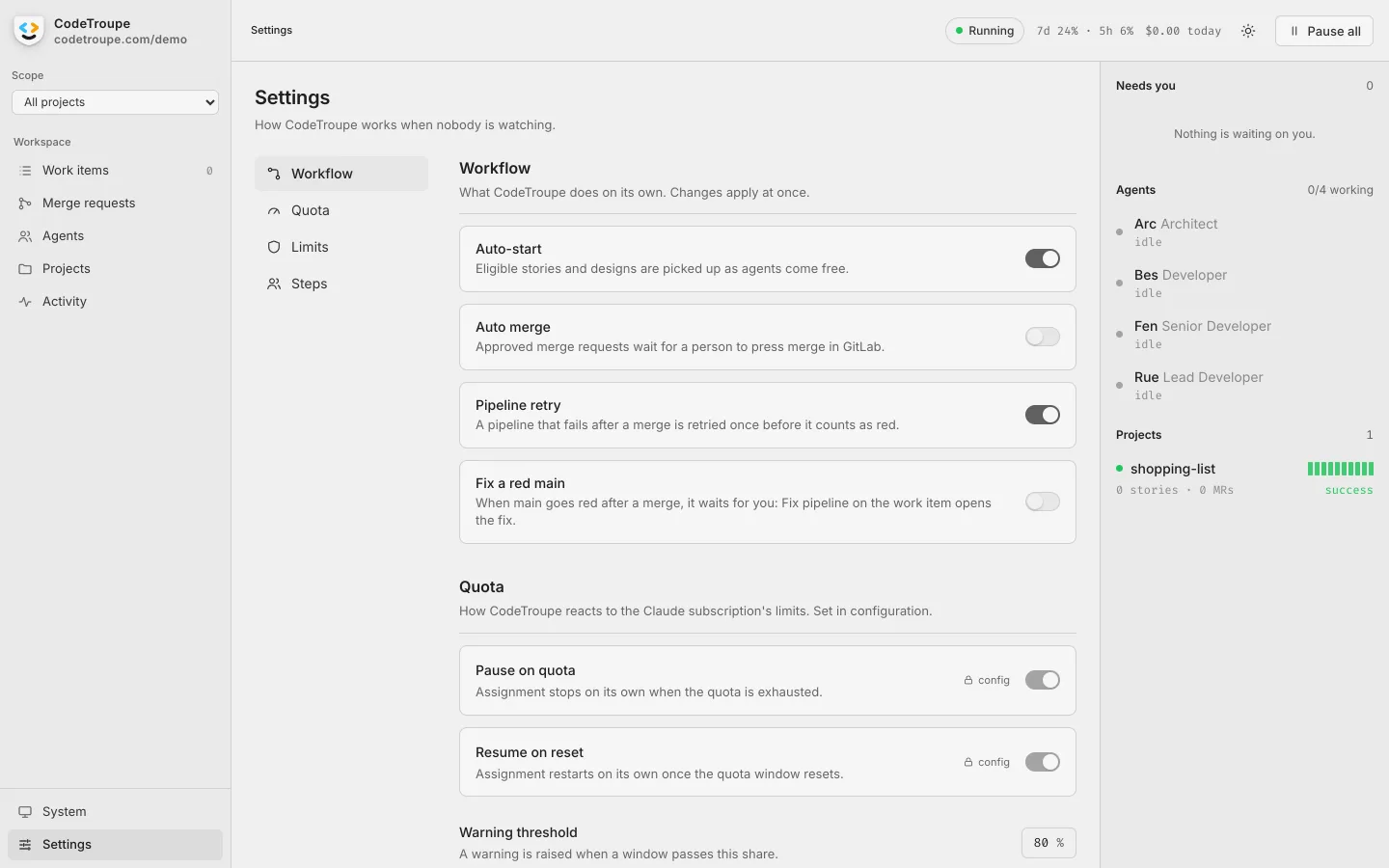
Settings How CodeTroupe works when nobody is watching: starting work, merging, retries and the usage limit.


Join the troupe
Sign up for news and release notes from the CodeTroupe developer preview, and follow it as it grows.
News and release notes now and then. Unsubscribe any time. How we handle your address.
Questions
What exactly is CodeTroupe?
A service you install on your own Linux server: the orchestrator that runs a team of AI agents through your development process.
- Coordination: it turns a goal into a design and stories, orders them by what depends on what, gives each to the cheapest free agent whose role fits, and hands it on from the agent who builds it to the one who reviews it, and then to you.
- Completion: it drives every story to done, through review rounds, rebases and red pipelines, until you approve it and the pipeline after the merge confirms it.
- Your workflow: every change gets a branch, a merge request, a review, a passing pipeline and a person’s approval.
- Monitoring: it notices a session that stalls or keeps failing, holds each story to its budget and limits, and pauses when your AI quota runs out.
- Guard rails: each role gets only the tools it needs. Architects and reviewers can read the code but not change it, and developers run only allowed commands, each in a workspace of its own.
- A full record: every session’s transcript, every step in the activity log, and every commit under the agent’s own name.
The agents work through Claude Code and GitLab, each under an account of its own. A web interface on the same server shows you all of it, and nothing runs on our side.
Who is CodeTroupe for?
Small software teams and solo developers who follow sound software engineering practice: work planned as stories, every change on its own branch, reviewed and checked by a pipeline before it ships. CodeTroupe’s AI agents join that process as members of your team and are held to it like everyone else. They plan, build and review the work, while you set the goals and decide what ships. If you want an AI that writes code on request, without stories, reviews or a pipeline, a coding assistant suits you better.
Which AI models do the agents use?
Claude models from Anthropic, through Claude Code. You choose one for each agent, with how hard it thinks: the most capable for planning, reviewing and complex work, and a faster one for routine stories. Other AI providers are in the works.
How can I customise the agents?
In four ways:
- The team: in the install’s configuration, each agent’s name, role and title, its model and how hard it thinks, which work it takes (simple, normal or complex), and how many sessions it runs at once.
- Your repository’s know-how: the agents follow a project’s
CLAUDE.mdand the skills in its.claude/skills, the same ones your developers use. A repository can also keep its own format for designs. - More tools: MCP servers you add to the install, remote or installed on the server, with their secrets kept apart from the configuration. For each role you name the tools it may call; anything else is refused.
- Its commands: the shell commands your developer may run, added to its built-in list or taken out, for every project or only some. A shell, or a git command, can’t be added.
The workflow itself stays CodeTroupe’s.
Which Claude credential do I need?
It depends on who uses your install. For a team, or any install other people use: an Anthropic API key, billed to its owner. For your own install, used only by you: your own Claude Pro or Max subscription, signed in through Claude Code’s own login. CodeTroupe never sees or stores it.
What does it cost to run?
CodeTroupe itself is free. The AI usage is yours: billed to your API key, or counted against your subscription’s limits. Every story has a budget, and CodeTroupe shows what each story, agent and project has spent.
Where does it run, and where does my code go?
On a Linux server of yours, as a single service. Your code stays in your repositories and on that server. While an agent works on a story, what it reads goes to Anthropic, the model provider.
Is CodeTroupe a cloud service?
No. You install it yourself, with one command, on a Linux server with systemd. There’s nothing to sign up for.
Which tools does it work with?
GitLab today, on gitlab.com or your own, and its free tier is enough. GitHub, Jira and Linear are in the works.
Is it free?
Yes. The developer preview is free to use within your own organisation, under the PolyForm Internal Use License.
What’s the developer preview?
The first public release. Everything runs on one server, you open the web interface through an SSH tunnel, and help comes from the community rather than from us. Agents on other machines come with the final release.
Where can I get help?
There’s no official support during the developer preview. Ask in the #help forum of the CodeTroupe Discord: other members answer, and so do we when we’re around, with no guaranteed response time.